Ini Adalah Tutorial Flashing Stock Rom on Intel Chipset based smartphones menggunakan Intel Phone Flash Tool.
Perhatian: Sebelum Melakukan Flashing sebaiknya perhatikan daya pada batrei Smartphone anda minimal 75%,untuk menghindari hal yang tak diinginkan.
Flash stock rom using Intel Phone Flash Tool
Langkah 1:
Download dan Install Intel USB Drivers (yang terbaru).
Langkah 2:
Download dan
install Intel Phone Flash Tool pada Computer.
Langkah 3:
Power Off Android Smartphone anda.
Langkah 4: Download
Stock Rom sesuai dengan Android Smartphone dan extract folder Computer anda.
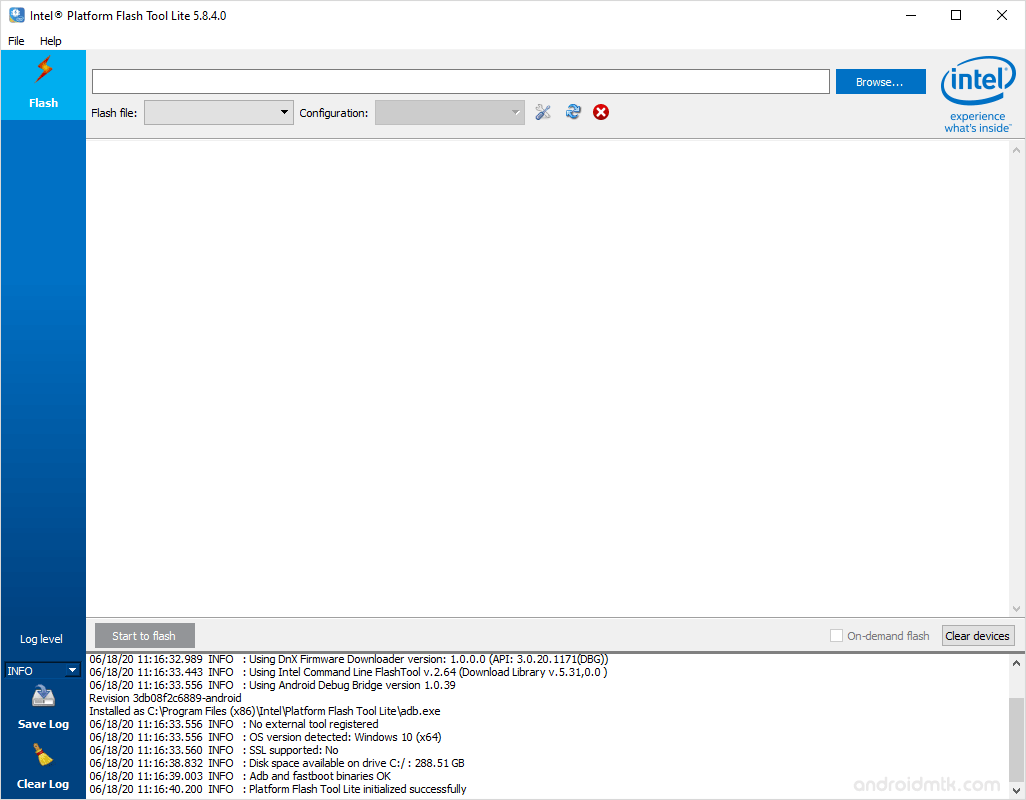
Langkah 5: Click on the
Browse Button from the Right.
Langkah 6: Now, Locate the
Flash.xml File (you will find this file in the Stock Rom you have downloaded).
Langkah 7: Now,
connect your Android smartphone to the computer (Make Sure it is
Power Off).
Langkah 8: Once you have successfully added your smartphone to the computer, Intel Phone Flash Tool will show it in the blank area.
Langkah 9: Now, Click on the
Start to Flash Button to begin the Flashing Process.
Langkah 10: Now, Intel Phone Flash Tool will flash the Stock rom on your Android smartphone. You can see the Flashing process bar in the right side.
Langkah 11: Once Flashing is completed, a
Done message will appear.



Comments
Post a Comment